
If you are trying to publish children’s activity books on Amazon KDP, Etsy, or Teachers Pay Teachers in 2026, you have almost certainly spent grueling hours aligning dotted tracing fonts, struggling with print bleed settings, and wrestling with cover spine calculators inside graphic editing tools like Canva.
So, What Exactly Is EchoBooks AI?
EchoBooks AI is an automated publishing tool that turns simple word lists into print-ready children’s workbooks featuring embedded audio QR codes on every single page.
Instead of manual drag-and-drop design, you follow a simple automated workflow to create published assets effortlessy.
Step 1: Pick a pre-loaded word list such as Dolch Pre-Primer, Primer, or Grade 1 Spelling.
Step 2: Choose your illustration theme and select a synthesized teaching voice for the page scripts.
Step 3: Click generate to download a 300 DPI interior PDF, a calculated full-wrap KDP cover, and an Amazon listing description instantly.
The entire process removes adult dependency, producing a child-ready book that literally reads itself out loud.
Honestly, the first time I loaded a sight-word prompt into the wizard, I felt a wave of healthy skepticism about the audio quality.
I pointed my smartphone camera at the generated test page, expecting a metallic robot voice that would annoy a toddler.
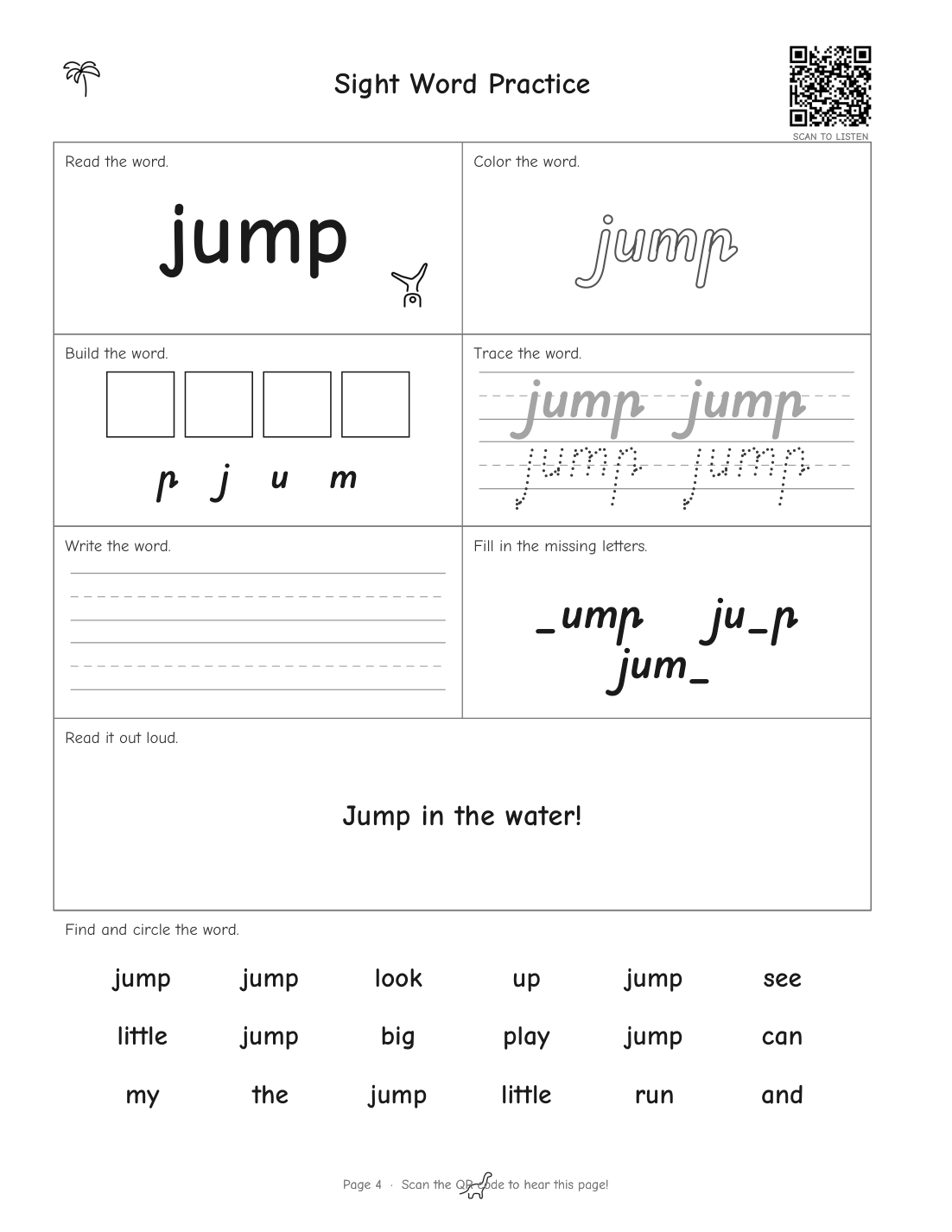
When a clear, perfectly paced voice began spelling “jump” and teaching it in a sentence, I felt genuine excitement knowing I hadn’t recorded a single sound file myself.
EchoBooks AI Vs Canva 2026: Which Tool Is Better For KDP Workbooks?
The self-publishing landscape on Amazon KDP has shifted dramatically over the past few years.
Back in 2022, publishing a standard low-content tracing book built inside Canva was often enough to secure passive royalties.
Today, search results for children’s sight-word workbooks are inundated with tens of thousands of near-identical silent interior PDFs.
When buyers use Amazon’s “Look Inside” feature, almost every book looks like the same static collection of black-and-white grid lines.
This reality forces self-publishers to confront a crucial decision regarding software choice in 2026.
Should you continue using Canva for manual graphic layout, or adopt a dedicated algorithmic generator like EchoBooks AI?
To evaluate this fairly, I spent several weeks testing layout workflows, KDP print margin specifications, cover file generation, and audio hosting mechanics across both platforms.
The Core Architectural Difference: General Graphic Software vs Specialized KDP Engine
Canva is an extraordinary, world-class graphic design tool built for social media graphics, slide presentations, and general marketing collateral.
However, Canva was never engineered specifically as an automated book layout engine for print-on-demand publishing platforms like Amazon KDP.
When you create a 50-page activity book inside Canva, you are forced to design every single element manually across 50 separate canvas frames.
You must manually drop in letter tracing lines, calculate box spacing, align sentence structures, and ensure clipart style consistency across every page.
EchoBooks AI operates on an entirely different architectural principle.
It functions as an automated PDF compilation engine tailored specifically to educational children’s books.
Instead of manually arranging graphics on a blank canvas, you feed the system structured data like vocabulary words or spelling lists.
Speed and Layout Efficiency: 2 Evenings in Canva vs 3 Minutes in EchoBooks AI
When assembling a standard 40-word children’s sight workbook in Canva, a publisher must construct eight distinct educational activities per word.
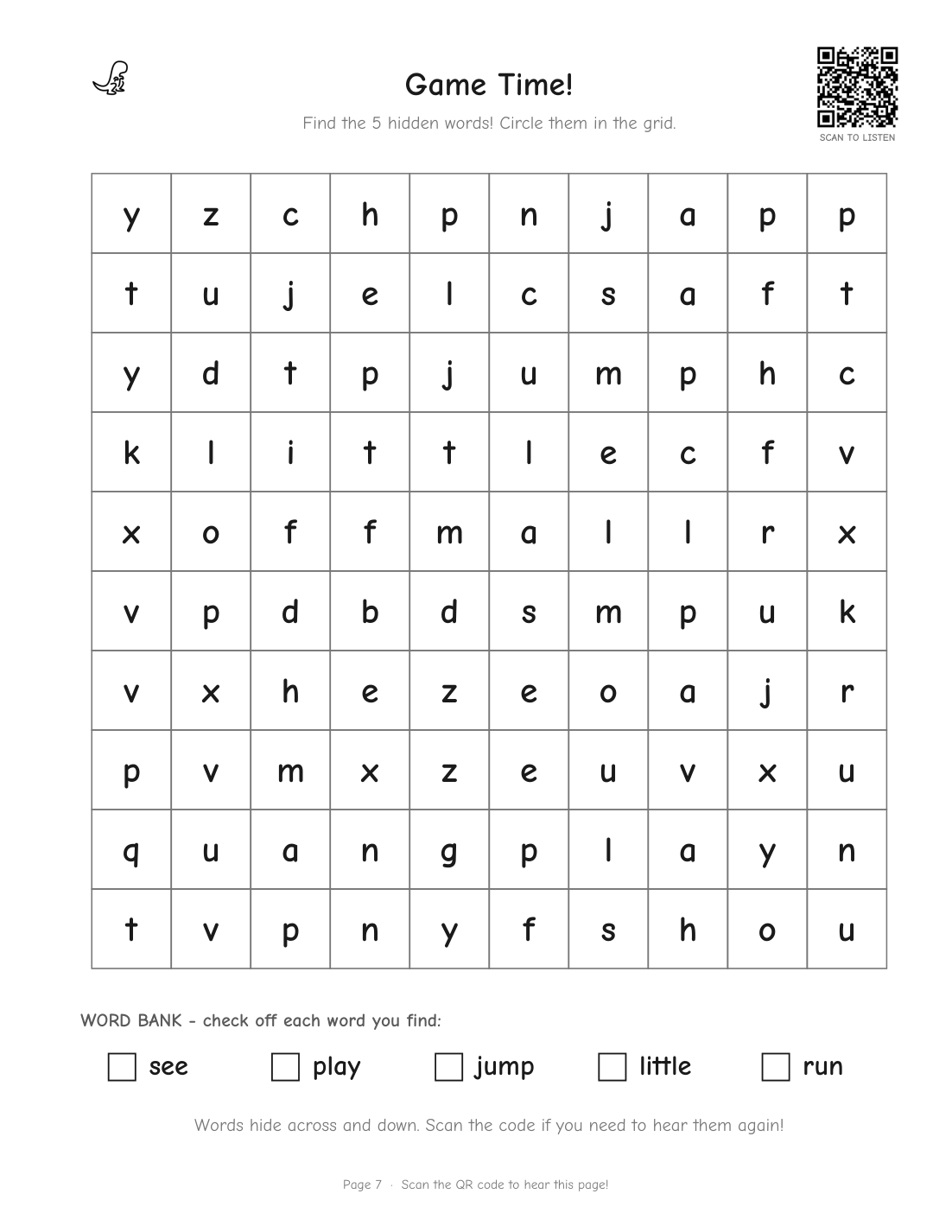
These activities include word reading header blocks, color-in outline fonts, letter boxes, tracing dashed lines, writing practice ruled lines, missing letter puzzles, example sentence containers, and letter-search grids.
In Canva, creating a single page with all eight activities requires aligning dozens of individual text frames and line paths.
Multiplying that process by 40 words means tweaking over 1,000 separate canvas objects across two exhausting evenings.
If you decide to change the font size or line thickness on page 3, you are forced to manually repeat that adjustment across the remaining 39 pages.
In contrast, EchoBooks AI handles layout programmatically in under three minutes.
You select your word set, choose your illustration theme, and the system instantly renders 8.5×11 inch interior PDF pages with zero manual alignment required.
Audio Integration and QR Technology: Static Worksheets vs Interactive “Talking” Books
The single greatest weakness of Canva when building low-content KDP books is its inability to natively generate dynamic, self-hosted audio assets.
Canva allows you to paste static QR codes onto designs, but you must acquire those QR codes from third-party URL shortcut services.
If you want a children’s workbook page to speak, you would have to record 40 separate MP3 voice clips yourself.
Then you would need to host those audio files on a personal cloud server and pay a monthly subscription fee for a dynamic QR code management platform.
If you ever cancel that $15 per month QR code subscription, every physical book sitting on a customer’s bookshelf goes permanently silent.
EchoBooks AI completely resolves this technical nightmare by embedding native audio generation into its PDF compilation engine.
Every word page includes an auto-generated QR code linking to a hosted audio page on Leo Sterling’s permanent web servers.
When a parent or child points any standard smartphone camera at the printed page, the phone immediately plays a clear teaching voice.
The voice speaks the word clearly, spells each letter individually, uses the word in an engaging sentence, and prompts the child to repeat it aloud three times.
There is no third-party app for parents to install, no user login required, and no ongoing monthly subscription charge for the publisher.
Cover Spine Calculation and Formatting Precision
Submitting cover files to Amazon KDP is notoriously frustrating for beginners using general graphic software.
KDP requires full-wrap PDF covers where the total canvas width is calculated down to the decimal point based on interior page count and paper weight.
In Canva, calculating spine width requires running manual formulas, such as multiplying page count by 0.00225 inches for black-and-white paper.
You must then add 0.125 inches of bleed along all exterior edges and manually position the back cover barcode clear zone.
If your calculation is off by a fraction of a millimeter, KDP’s automated print validator rejects your upload file instantly.
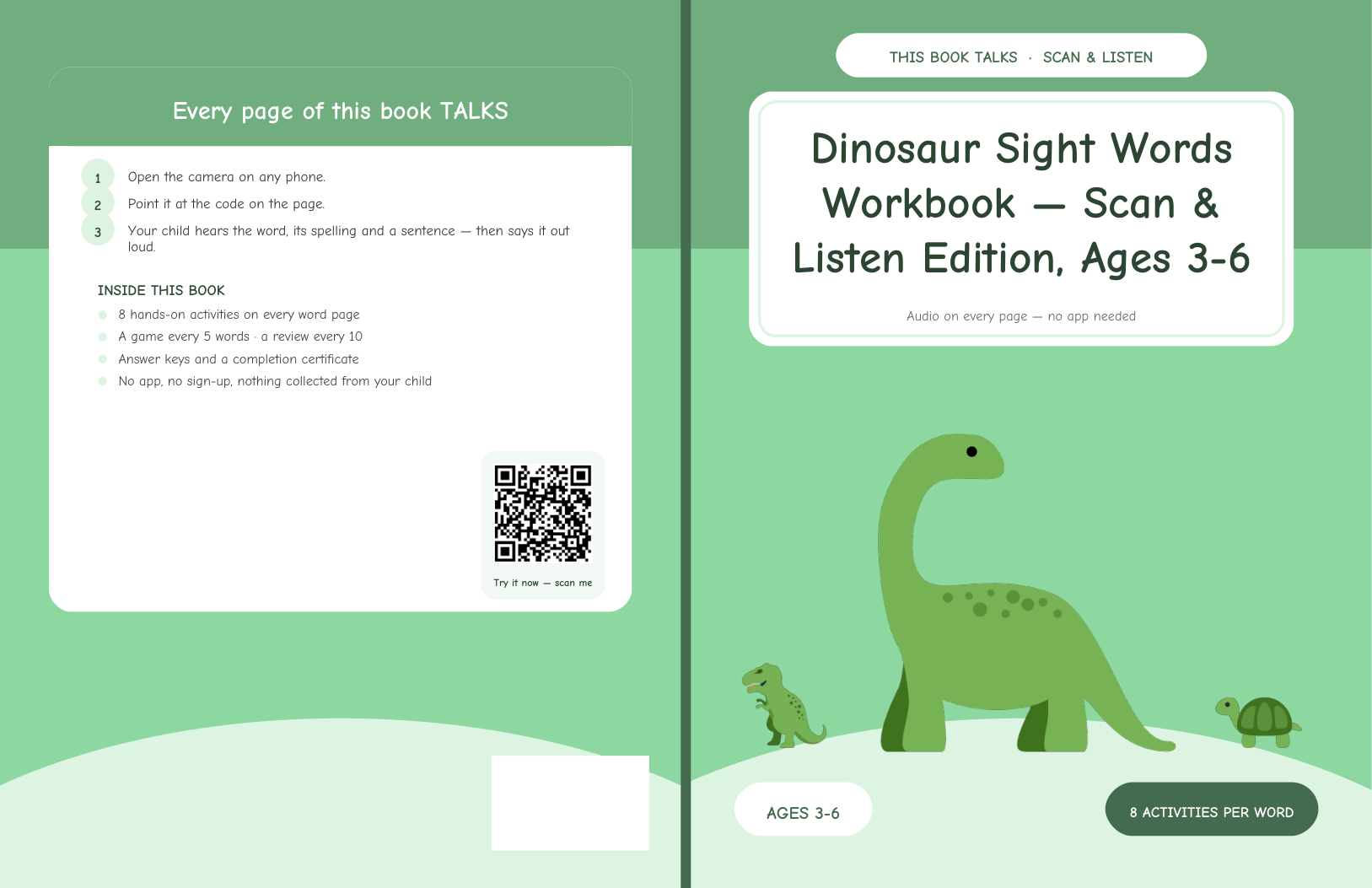
EchoBooks AI completely automates this process by generating a dynamic full-wrap cover based on the exact page count of your generated manuscript.
The front cover, spine width, and back cover layout are pre-calculated to fit KDP print specifications without any guesswork.
Additionally, the back cover automatically incorporates a promotional audio QR code so browsing parents can test the audio preview directly from the back of the physical book.
Children’s Activity Book Specifics: Tracing Fonts, Line Art, and DPI Rules
Designing printable educational materials introduces strict printing parameters that catch many Canva users completely off guard.
For example, standard light grey tracing fonts designed for digital screens frequently fade or disappear entirely when printed on low-grade KDP paper stock.
Furthermore, exporting custom Canva layouts without verifying vector resolution often results in blurry 72 DPI image artifacts that trigger KDP quality rejections.
EchoBooks AI incorporates high-contrast vector tracing paths engineered specifically for physical paper printing.
It includes a built-in library of 389 vector line-art illustrations matched precisely to vocabulary terms, eliminating stock photo licensing concerns.
All interior PDF outputs are hardcoded at 300 DPI print-ready resolution with mirrored gutter margins pre-configured for standard bound workbooks.
For a detailed breakdown of the software’s foundational feature set, you can read our full EchoBooks AI review.
EchoBooks AI vs Canva Direct Feature Comparison (2026)
To help you compare both software solutions clearly, we have compiled a direct head-to-head breakdown based on practical self-publishing workflows.
| Feature Metric | Canva (Pro & Free) | EchoBooks AI ($17 Launch) |
|---|---|---|
| Creation Speed (40-Page Book) | 2 to 5 hours of manual layout work | Approximately 3 minutes automated |
| Audio QR Code Generation | Manual external tools required | Automated audio hosting embedded |
| Monthly Recurring Costs | $13/mo (Canva Pro) + QR fees | Zero ($17 single payment launch) |
| KDP Full-Wrap Spine Calculation | Manual pixel & inch math required | Automated wrap cover generator |
| Illustration Library | General stock vectors (mixed style) | 389 dedicated line-art assets |
| Amazon Listing Optimization | Manual research required | Auto-generated description & keywords |
| Gutter Margin Compliance | Manual drag-and-drop alignment | Pre-set KDP mirror margins |
| Multi-Platform Selling (Etsy/TpT) | Manual header layout adjustments | 1-click Name/Date classroom toggle |
Objective Pros and Cons Analysis
Every software tool involves trade-offs depending on your specific publishing goals and technical requirements.
Below is our transparent evaluation of the advantages and limitations of both solutions.
EchoBooks AI Pros
- Unmatched Publishing Speed: Generates a full 50-page formatted PDF interior in under 3 minutes.
- Embedded Spoken Audio Engine: Pre-written teaching scripts read, spell, and demonstrate words automatically.
- Permanent Server Hosting: Zero recurring hosting bills ensure your published QR codes stay live indefinitely.
- Complete Publishing Pack: Generates KDP interiors, wrap covers, and Amazon backend keywords simultaneously.
- No Monthly Subscription: Single front-end payment of $17 provides unlimited book creation capability.
EchoBooks AI Cons
- Niche-Specific Scope: Dedicated strictly to educational workbooks, sight words, and spelling activities.
- Fixed Layout Formatting: You cannot freely drag individual graphics anywhere on the canvas like standard design software.
- Upgrade Architecture: Advanced vocabulary packages like Fry lists and multi-voice options require optional PRO upgrades.
Canva Pros
- Complete Design Freedom: Pixel-perfect control over every object, shape, color, and font setting.
- Vast Template Ecosystem: Hundreds of general printable templates created by third-party designers.
- Versatile Multi-Format Use: Ideal for social banners, YouTube thumbnails, and general branding graphics.
Canva Cons
- Exhaustive Manual Labor: Building a 40-word book requires aligning hundreds of individual elements by hand.
- No Native Spoken Audio Hosting: Cannot automatically generate or host dynamic educational audio clips.
- Ongoing Subscription Cost: Canva Pro requires an ongoing $13 monthly or $120 annual subscription commitment.
- Manual Cover Spine Math: Prone to dimensional errors that trigger KDP print rejection notices.
Legitimacy Check: Is EchoBooks AI Real or Marketing Hype?
Whenever a new self-publishing software launches with claims of 3-minute book creation, legitimate publishers are rightly cautious.
We conducted a deep technical verification on creator Leo Sterling and the architecture powering EchoBooks AI.
First, we tested the QR audio hosting infrastructure directly from the landing page proof section.
Scanning the sample QR code with an iPhone camera loaded an MP3 audio page instantly without requesting app downloads or user registration.
The audio server renders light HTML containing raw MP3 files hosted on minimal-bandwidth infrastructure.
Because static audio files consume fractions of a cent in server bandwidth per year, Leo Sterling’s promise of permanent hosting without monthly fees is technically and financially realistic.
Furthermore, the transaction is processed securely through WarriorPlus, backed by an official 30-day refund policy.
In an unusually customer-friendly policy, Leo Sterling guarantees that even if a buyer requests a refund, published audio QR codes remain active on his servers.
This ensures that children holding physical printed books will never experience broken links due to publisher administrative changes.
Publishers interested in securing this single-payment option can check single payment 17 dollar pricing directly.
Pricing Breakdown & Value Equation
Understanding the true cost of operating a self-publishing business requires looking beyond initial purchase price tags.
If you rely exclusively on Canva for KDP activity books, your annual operational cost structure looks like this:
- Canva Pro Subscription: $120 per year
- Dynamic QR Code Hosting Service: $60 to $180 per year
- Stock Illustration Subscriptions or Fiverr Cover Designers: $50 to $150 per book project
- Total Annual Expenditure: $230 to $450+ recurring
By comparison, EchoBooks AI operates on a simple launch pricing model:
- EchoBooks AI Starter Front-End: $17 one-time payment
- 389 Vector Line-Art Asset Library: Included ($0 extra)
- Full-Wrap KDP Cover Engine: Included ($0 extra)
- Permanent Audio QR Hosting: Included ($0 extra)
- Total Launch Expenditure: $17 total one-time payment
For a single $17 investment, you acquire an automated book builder that pays for itself after publishing your very first KDP manuscript.
Final Verdict & Strategic Recommendation: Which Software Wins in 2026?
When comparing EchoBooks AI against Canva in 2026, the ultimate choice depends heavily on what kind of publishing business you are running.
If your primary goal is general custom graphic design, social media marketing, or heavily customized aesthetic planners, Canva remains an essential multipurpose tool.
However, if your primary goal is scaling a profitable children’s educational book catalog on Amazon KDP, Etsy, or Teachers Pay Teachers, EchoBooks AI is objectively superior.
EchoBooks AI solves the critical structural flaw of physical print workbooks by giving printed paper an interactive, spoken voice.
It eliminates hours of repetitive manual alignment, automates complex cover spine calculations, and provides permanent audio hosting for a single $17 launch price.
In a saturated self-publishing marketplace where tens of thousands of silent workbooks compete strictly on rock-bottom prices, publishing “talking workbooks” creates a undeniable competitive edge.
If you have any questions regarding our testing methodology or need assistance choosing KDP software, feel free to reach out directly to admin@uprightreview.com.