
If you want to stop wasting six hours a week chasing client post approvals and stop getting punished by bloated per-seat software bills every time your team grows, keep reading.
Because right now, there is a solid chance your agency workflow is held together by duct tape, messy Google Sheets, and late-night Slack messages begging a client to say yes to Tuesday’s Instagram carousel.
I have been right there in the trenches with you.
Nothing kills your profit margin faster than logging in and out of fifteen different social accounts, manually pasting captions, and praying nobody accidentally posts a roofing ad onto a luxury dental client’s Facebook page.
That exact nightmare is why I spent weeks stress-testing this platform from top to bottom for this honest Cloud Campaign Review.
I wanted to know if it actually cleans up multi-client social chaos, or if it is just another shiny scheduler with a bloated price tag.
Spoiler alert: after putting real client calendars, automated drip schedules, and one-link approval sheets through the wringer, Cloud Campaign genuinely impressed me.
Short answer: Yes, Cloud Campaign is a massive win for agencies and multi-brand teams, and here is why.
Starting price: $49/month ($41/month billed annually), with unlimited team and client users on every plan.
Best for: Marketing agencies, freelance social media managers, and multi-location brands juggling multiple client calendars.
Trial & cancellation: 14-day free trial with cancel-anytime flexibility (no refunds once a billing cycle starts).
Key strength: Isolated client workspaces, no-login approval links, and white-label portals (start your 14-day Cloud Campaign trial here).
Disclosure: This page contains a partner link. If you sign up through it, we may earn a commission at no extra cost to you, and it never changes my honest opinion.
Ready to test the cleaner agency workflow yourself? Start right here ↓
Includes a full 14-day free trial. Cancel anytime before day 14 and pay nothing.
Overview: What Exactly is Cloud Campaign?
Most social media tools were built for a single brand manager sitting at a desk, and then agencies tried to duct-tape twenty clients inside them.
Cloud Campaign flipped that script completely by building an agency-first, white-label social media management platform from the ground up.
Their mission is straightforward: help marketing agencies, freelancers, and multi-location brands deliver polished social media at scale without adding payroll or software headaches.
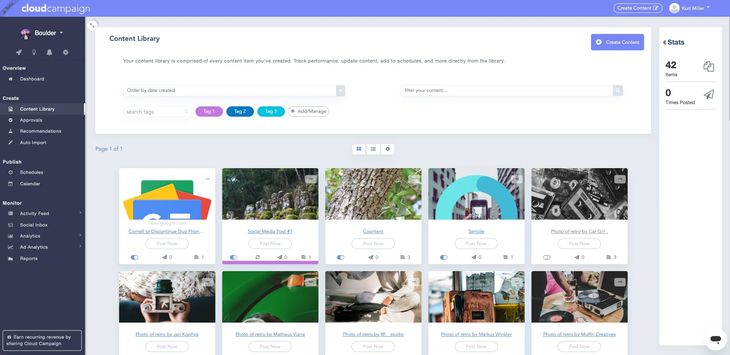
Instead of dumping every client’s assets into one terrifying shared folder, Cloud Campaign isolates each client inside their own dedicated Brand Workspace.
Every workspace holds its own connected social profiles, taggable content library, posting schedules, brand voice settings, approval links, and analytics reports.
It publishes natively across eight major networks: Facebook, Instagram, LinkedIn, TikTok, YouTube, Pinterest, Threads, and Google Business Profile.
What Happens Inside Your Daily Workflow
Once you connect a client’s channels, everything flows smoothly from asset creation to client sign-off and automated publishing.
Here is what the core toolkit actually does for your day-to-day sanity:
- Isolated Brand Workspaces → What it means for YOU: Each client gets a locked-down sandbox with their own library and brand voice, so you never live in fear of posting Client A’s meme on Client B’s LinkedIn.
- Category-Based Drip Schedules & Content Recycling → What it means for YOU: Tag evergreen posts once and let auto-filled queues keep client feeds active automatically, saving hours of manual calendar plugging.
- One-Link Client Approvals → What it means for YOU: Email a secure mobile-friendly link where clients approve an entire month of posts without creating a password, ending endless email threads.
- Built-In AI Toolkit (CaptionAI, ImageAI & AI Social Inbox) → What it means for YOU: Draft platform-specific captions, generate localized visuals, and write comment or DM replies in each brand’s voice, included free on every tier.
- One-Click Branded Reporting → What it means for YOU: Generate clean organic reports (plus paid social reporting on the Agency plan) in seconds instead of screenshotting native insights on Friday afternoon.
- Canva, Google Drive, RSS & Zapier Integrations → What it means for YOU: Pull finished graphics directly from Canva or Drive and automate onboarding across 7,000+ apps without bouncing between twenty browser tabs.
Cloud Campaign Pricing: How Much Does It Really Cost?
Let us talk money, because social media software pricing is usually where agencies get quietly robbed.
First, be crystal clear on one detail: Cloud Campaign has no permanently free plan.
You get a 14-day free trial to test everything, and after that, you choose one of three transparent workspace-based tiers: Freelancer, Team, or Agency.
Every single plan includes unlimited internal team members and unlimited external client reviewers at zero extra cost.
Instead of taxing you every time you hire a copywriter, bring on a virtual assistant, or invite a picky client stakeholder to review posts, you pay strictly by active brand workspace.
Breaking Down Monthly vs. Annual Costs and Extra Workspaces
Paying annually gives you two months free (roughly 17% off), which makes a noticeable dent in your annual software overhead.
On the Freelancer plan ($49/month monthly or $41/month billed annually), you get 1 brand workspace, 7 social accounts per client, AI tools, scheduling, approvals, and chat support.
If you add extra workspaces on Freelancer, each one costs $49/month ($41/month annual), and note that white-labeling is not included by default on this starter tier.
The Team plan ($199/month monthly or $165/month billed annually) is their most popular sweet spot, bundling 5 brand workspaces, unlimited social accounts, standard white-labeling, phone support, and live workshops.
Adding extra workspaces on Team drops the per-brand cost down to $29/month ($24/month billed annually)—that works out to roughly $33 to $40 per client on your first five clients, and even less as you grow.
The Agency plan ($299/month monthly or $249/month billed annually) includes everything in Team plus advanced white-labeling with your own custom domain and agency-branded emails, paid social reporting, Single Sign-On (SSO), API integrations on annual commitments, and hands-on client migration.
Additional workspaces on the Agency tier run $35/month monthly ($29/month billed annually), and custom Enterprise volume pricing is available if you have 50+ users or massive multi-location rosters.
There is also an optional per-workspace add-on called CloudStudio starting at $99/month per workspace, which delivers a monthly strategy brief and human-reviewed, AI-assisted content calendars (3, 7, or 14 posts per week) automatically scheduled inside Cloud Campaign.
Why the Per-Workspace Math Beats Per-Seat Tools
Here is where an honest price anchor puts everything into focus.
Competitors using per-seat pricing like Sprout Social start at $249/month per user, meaning a 3-person agency team needing client approvals on Hootsuite or Sprout can easily face $747 to $1,197/month before counting extra client complexity.
For illustration, even if Cloud Campaign only saves your team 6 hours a week across 5 clients at a conservative $50/hour internal labor cost, you are reclaiming $1,200/month in billable capacity while paying $165 to $199/month on the Team plan.
That makes the ROI ridiculously lopsided in your favor as long as you are charging real agency retainers.
| Plan / Option | Monthly Price | Annual Rate (Per Mo) | Included Workspaces & Extra Cost | Best For |
|---|---|---|---|---|
| Freelancer | $49/mo | $41/mo | 1 workspace (7 accounts/client). Extra: $49/mo ($41 annual) | Solo managers testing 1–2 brands |
| Team My Pick | $199/mo | $165/mo | 5 workspaces (unlimited accounts). Extra: $29/mo ($24 annual) | Growing agencies needing white-label portals (~$33/client/mo on annual) |
| Agency | $299/mo | $249/mo | 5 workspaces + custom domain, paid reporting, SSO, migration. Extra: $35/mo ($29 annual) | Scaling agencies reselling a fully branded client experience |
| CloudStudio Add-On | From $99/mo | Per workspace | Done-for-you monthly strategy & reviewed posts inside your workspace | Agencies wanting fast fulfillment without hiring |
| Typical Per-Seat Anchor (e.g., Sprout Social / Hootsuite) | $249–$399/user | Scales per team seat | Charges extra for every staff member or approver seat (illustration of typical 3-seat agency bill: $747–$1,197/mo) | Enterprise in-house teams with large seat budgets |
Lock in unlimited seats for your whole team before your next client onboard ↓
Zero per-seat surprises. Test every feature during your 14-day free trial.
The Strengths: What Makes Cloud Campaign Outstanding
When I set up my test environment, I purposely threw a messy multi-client scenario at Cloud Campaign to see where it would buckle.
I loaded up three wildly different brand personas—a local home-services contractor, a B2B consulting firm, and a boutique lifestyle brand—imported assets from Google Drive, and queued up a month of content.
Within twenty minutes, I felt a massive wave of pure operational relief because switching between those three workspaces required zero logging out and zero mental friction.
Why Your Clients Will Actually Love the Approval Portal
Ask any agency owner what kills client retention, and nine times out of ten it is not bad creative—it is friction.
Clients forget passwords, hate clunky enterprise dashboards, and ignore spreadsheets buried in Friday email threads.
With Cloud Campaign, I clicked once to generate an external approval link and opened it on my phone without logging into anything.
I could swipe through upcoming posts, leave a quick revision note on a graphic, and batch-approve an entire week in under ninety seconds.
Nothing publishes until that approval gate clears, and your team gets pinged by email the second a client clicks approve.
Automation That Keeps Calendars Full Without Sounding Robotic
Most schedulers force you to hand-place every single post onto a calendar grid like you are playing Tetris in 2014.
Cloud Campaign’s category tags and drip schedules let you organize content into buckets like “Client Wins,” “Industry Tips,” and “Seasonal Promos,” then automatically cycle evergreen posts at set intervals.
Pair that with CaptionAI—which actually adapts tone per brand workspace rather than spitting out generic fluff—and building out a month of diverse posts feels remarkably fast.
Add in custom-domain white-labeling on the Agency plan, and your clients log into your agency’s URL, receive reports from your agency’s email, and view dashboards stamped with your logo.
That single shift lets you position your agency as a high-trust tech-enabled partner instead of another replaceable freelancer.
| Strength | What it means for you |
|---|---|
| Hard-Separated Brand Workspaces | Each client has isolated accounts, libraries, and brand voices so cross-posting accidents become virtually impossible. |
| No-Login Client Approval Links | Clients review and batch-approve posts from their phones in seconds without remembering another password. |
| True White-Labeling (Team & Agency) | Your logo, colors, custom domain, and branded emails elevate your perceived value and justify higher retainers. |
| Unlimited Users on All Plans | Invite every writer, designer, VA, and client stakeholder without paying a dime in extra seat taxes. |
| Evergreen Drip Recycling & Bulk Tools | Stop rebuilding empty calendars from scratch every month; recycle proven winners on autopilot. |
| Per-Brand AI Toolkit Included Free | CaptionAI, ImageAI, and the AI Social Inbox adapt to each client workspace at no additional AI credit charge. |
The Weaknesses: Where Cloud Campaign Falls Short
No software is flawless, and if a review tells you a tool has zero downsides, you should close the tab immediately.
During my testing and deep dive into verified 2026 user feedback, four legitimate limitations stood out.
- No X (Twitter), Bluesky, or Snapchat publishing: Cloud Campaign’s current published network list covers eight major platforms, leaving X out of the scheduler. That said, for the vast majority of local businesses, B2B firms, and consumer retainers, Facebook, Instagram, LinkedIn, TikTok, YouTube, Pinterest, Threads, and Google Business Profile cover 99% of where client ROI actually happens.
- White-labeling is excluded by default on the Freelancer tier: If you start on the $49/month plan, you get client portals and approvals, but you must upgrade to Team ($199/month) for standard white-labeling or Agency ($299/month) for custom domains. That actually makes sense financially because solo operators rarely need custom-domain branding until they have 3 to 5 paying clients ready to justify the jump.
- Extra brand workspaces add $29 to $49/month per client beyond your base plan: When your roster scales past 15 or 20 clients, your monthly software bill climbs steadily with each workspace. Even so, if a single client retainer brings in $1,000 to $2,500/month, paying $24 to $35/month to house their entire social operation is pocket change.
- Occasional minor publishing or reconnection hiccups: A handful of G2 and Capterra reviewers mention occasionally needing to reconnect a social profile or experiencing minor bulk-upload glitches. Thankfully, this happens across virtually all third-party schedulers due to Meta and LinkedIn API token resets, and Cloud Campaign’s responsive support team usually resolves connection issues fast.
Skip Cloud Campaign if…
- You are a solo creator or hobbyist looking for a permanently free tool to schedule 5 personal posts a week.
- Your entire client strategy revolves around real-time X (Twitter) threads or heavy Bluesky community posting.
- You need an enterprise social CRM and full paid ad-buying suite rather than a streamlined publishing, approval, and reporting hub.
Who is Cloud Campaign Perfect For?
If you only manage one personal Instagram account for your side hustle, Cloud Campaign is honestly overkill.
This platform was engineered specifically for people who get paid to manage social media for other businesses or oversee multiple distinct brands under one roof.
This is you if:
- You run a digital marketing agency managing 3 to 100+ clients and want every client to experience a sleek, branded dashboard with your agency’s logo on it.
- You are a freelance social media manager tired of paying per-user penalties every time you bring on a virtual assistant or give a client access to approve drafts.
- You manage franchise or multi-location brands (like dental clinics, real estate brokerages, or home-service contractors) that need corporate-approved posts pushed across dozens of local profiles.
- You spend way too many hours chasing client approvals over email and want one mobile-friendly link that turns a 5-day back-and-forth into a 2-minute sign-off.
Guarantees, Trial Policy, and Customer Support
Before you enter a credit card anywhere online, you deserve zero surprises about billing rules and what happens if you change your mind.
Let us look at exactly what Cloud Campaign guarantees—and what they explicitly do not guarantee—according to their published terms and support policies.
What Is Guaranteed and What Is Not
Every plan begins with a full-featured 14-day free trial, which even lets you test out the CloudStudio add-on before committing.
Note that signing up for the trial may require a valid payment method, and automatic billing starts on day 15 unless you cancel prior to the end of the trial window.
Cancel anytime during those 14 days and you pay $0.
Once a paid subscription period begins, however, Cloud Campaign does not offer a traditional 30-day money-back guarantee—subscriptions are billed in advance and are non-refundable for the current billing period.
You can change plans or cancel anytime with zero lock-in contracts on standard plans (upgrades/changes are pro-rated, annual downgrades take effect at renewal, and CloudStudio cancellations must be submitted before the 15th of the billing month).
They also explicitly note in their Terms of Service that they do not offer uptime compensation or refunds if a third-party network like Meta or LinkedIn alters its API.
That is completely standard in SaaS, and knowing it upfront means you should use your 14-day trial window seriously to test your real client accounts.
US-Based Customer Support and Real Social Proof
Where Cloud Campaign genuinely shines compared to budget schedulers is human support.
Their customer success team is based in the US (with offices in Portland, Oregon and Boulder, Colorado), offering live chat on every tier, phone support starting on Team, and dedicated migration help for up to 100 clients on Agency.
When I tested a workspace permission question via chat, I got a clear, practical answer from a real person who actually understood agency workflows rather than a robotic copy-paste script.
What Verified Agencies Are Saying in 2026
Cloud Campaign holds an exceptional 4.9 out of 5 rating on G2 across 166 verified reviews (93% five-star, zero one-star or two-star reviews) and a 4.9 out of 5 rating on Capterra across 162 reviews, sweeping four Capterra 2026 Awards including Best Ease of Use, Best Customer Support, Best Value, and Most Recommended.
Published customer results tell the same story: Frogman Media Group migrated 40+ clients in under two weeks and saved 3+ hours daily, Strategic America reclaimed 3+ workdays per quarter through automated reporting, and Eventbrite consolidated four separate tools into one while lifting engagement by 50%.
Quick Answers to Your Biggest Objections
Do I really pay nothing extra when I add team members or clients?
Yes, every Cloud Campaign plan includes unlimited internal users and unlimited external client reviewers at no extra per-seat cost.
What happens if I decide Cloud Campaign is not for me?
If you cancel before your 14-day free trial ends, you are charged nothing, and paid month-to-month plans can be canceled anytime with no lock-in contracts (though already-billed periods are non-refundable).
Can I put my own agency branding on the client experience?
Standard white-labeling is included free on the Team plan ($199/month), while full custom-domain and agency-branded email white-labeling is included on the Agency plan ($299/month).
Which social platforms can I schedule to?
Cloud Campaign supports direct publishing to eight networks: Facebook, Instagram, LinkedIn, TikTok, YouTube, Pinterest, Threads, and Google Business Profile (X/Twitter is currently excluded).
Think carefully about what pushing this decision off until “next month” actually costs your business.
Every week you stay stuck on spreadsheets or overpriced per-seat software, you burn precious billable hours chasing approvals, formatting manual reports, and paying extra taxes just to let your own team collaborate.
Meanwhile, your competitors are onboarding clients faster with white-labeled portals that look like custom agency software—giving you a massive incentive to spin up your 14-day trial today rather than letting another billing cycle slip away.
Test Cloud Campaign with your real client workflow right now ↓
Full platform access for 14 days. Pro-rated plan changes and anytime cancellation.
Final Verdict: Why I Highly Recommend Cloud Campaign
To wrap up this Cloud Campaign Review cleanly: if you manage social media for clients or multiple brands, this is easily one of the smartest operational upgrades you can make this year.
Sure, it lacks X (Twitter) support and gates custom-domain white-labeling to higher tiers, but those minor tradeoffs pale next to the sheer hours and headaches it eliminates every single week.
Here is why pulling the trigger today makes complete sense:
- Zero seat penalties: Unlimited team members and client reviewers on every plan protect your margins as you hire and scale.
- Frictionless client experience: One-link mobile approvals and white-label reporting make your agency look twice as polished overnight.
- Proven reliability: Backed by 4.9/5 ratings across G2 and Capterra plus responsive US-based support that actually helps you migrate.
Do not spend another month wrestling clunky approval emails when you can put this entire system to the test risk-free for two full weeks.
Click here to launch your 14-day Cloud Campaign trial now and feel the difference in your very first client workspace.
Disclosure: this page contains a partner link. If you sign up through it, we may earn a commission at no extra cost to you. It never changes my honest opinion.